
After spending half a decade working in SEO and applying it across multiple websites, I’ve seen how quickly SEO can get messy. Crawling, indexing, keywords, content, internal links, site structure, page speed, and backlinks. They all matter.
However, they don’t all need your attention simultaneously.
If you’re trying to figure out how to optimize your website for SEO, this guide will walk you through the process in the order I’d follow today.
This is the SEO checklist I wish I had two years ago.
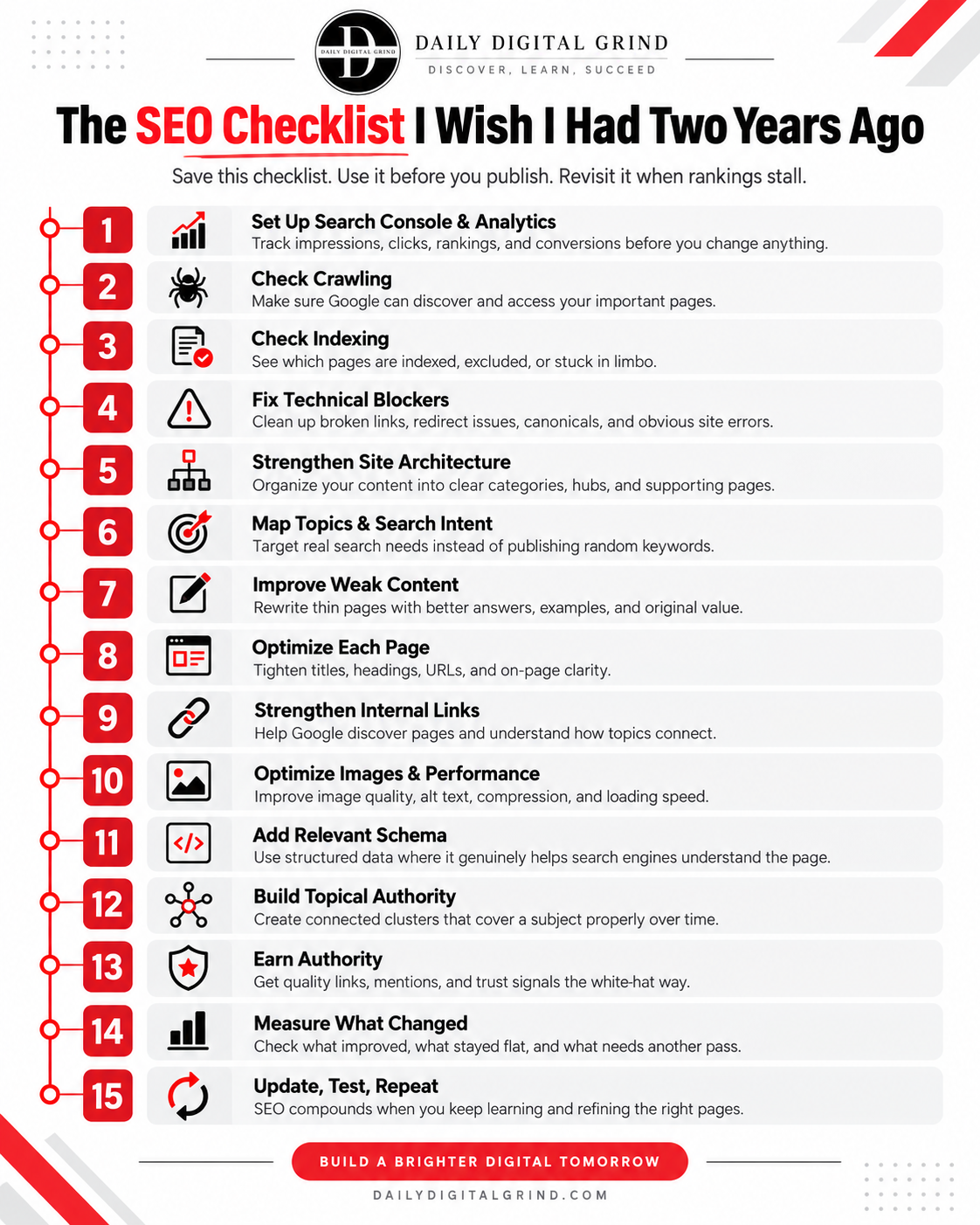
What Does It Mean to Optimize a Website for SEO?
Optimizing a website for SEO means making it easier for search engines to find, crawl, understand, index, and rank your pages for relevant searches. Moreover, those pages need to be useful enough that people click, stay, trust what they’re reading, and take the next step.
The same foundation matters for GEO (Generative Engine Optimization) and AEO (Answer Engine Optimization), where AI systems need to retrieve, understand, and cite your content.
This is why SEO can feel confusing at first.
You’re dealing with technical setup, content, keywords, internal links, site structure, page speed, backlinks, and more. Yet, not all of these things matter for your specific website.
For instance, a publisher trying to grow ad revenue has a different goal from a service business trying to generate leads. A SaaS company may care more about demos and signups than raw pageviews.
What Are You Trying to Get From SEO/GEO?
If your goal is vague, your SEO and GEO work usually becomes vague too.
“Get more traffic” sounds fine, but traffic by itself doesn’t tell you whether the right people are finding you.
Here’s a better way to think about it:
| Your Goal | What SEO Should Help Improve |
|---|---|
| Traffic or Pageviews | Search visibility, impressions, and organic clicks |
| Lead Generation | Rankings for high-intent searches and form submissions |
| More Sales | Commercial traffic, product visibility, and revenue |
| Higher Ad Revenue | Qualified organic pageviews and engaged sessions |
| Affiliate Sales / Revenue | Buyer-intent traffic and affiliate conversions |
| Brand Visibility | Branded searches, mentions, and repeat visits |
Once you know what you want SEO to achieve, the next question gets a lot easier. For traffic growth, focus on better visibility, stronger content, and ways to increase website traffic without paid ads.
Before You Change Anything, Do You Know What’s Wrong with Your Website?
One of the easiest ways to waste time in SEO is to start fixing things before you know what’s broken or what’s wrong with your website.
A traffic drop can come from a ranking loss, an indexing problem, lower search demand, a tracking issue, or something technical. Those problems can look similar from the outside, but the fix for each one is completely different.
From experience, whenever I audit a website, I start by looking at discovery, indexing, rankings, and traffic together. I want to see where the drop actually begins before I touch titles, content, links, or technical settings.
Is It a Crawling, Indexing, Ranking, Tracking, or Demand Problem?
You don’t need a complicated SEO audit to narrow this down. Start with what you can see in Google Search Console and your analytics.
| What You’re Seeing | What It Points To | What I’d Check First |
|---|---|---|
| Important pages aren’t being discovered or crawled | Discovery / crawling problem | Internal links, sitemap inclusion, robots.txt, crawl paths |
| Google crawls the page but doesn’t index it | Indexing / content-quality problem | Content value, duplication, canonical setup, soft-404 signals |
| Pages are indexed, but rankings have dropped | Ranking / relevance problem | Search intent, content quality, competition, recent algorithm changes |
| Rankings look stable, but impressions are falling | Demand problem | Seasonality, trend changes, declining query volume |
| GSC looks normal, but analytics traffic suddenly drops | Tracking problem | Analytics setup, tags, consent settings, reporting errors |
| Impressions are growing, but clicks stay flat | CTR / SERP problem | Title, meta description, search intent, SERP features |
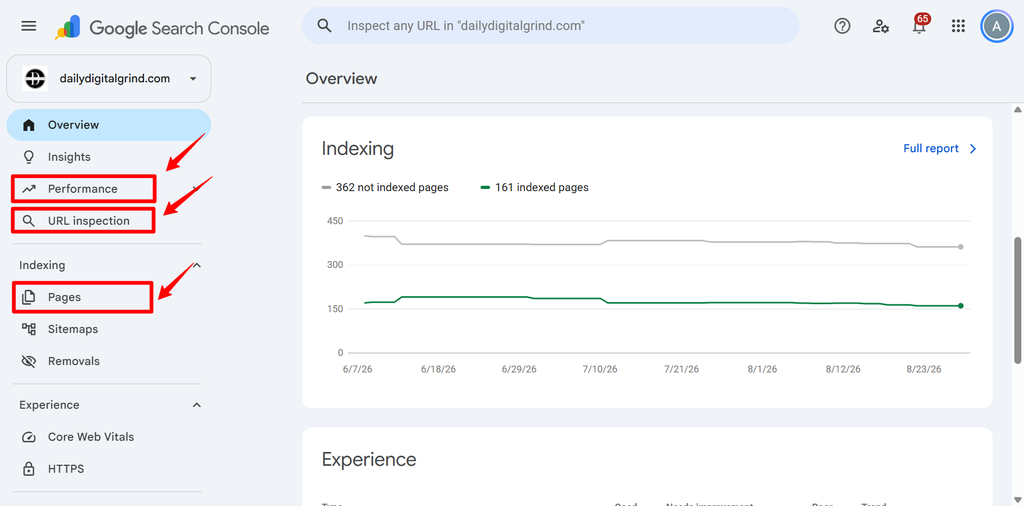
What Should You Check First in Search Console?
Start with Performance and look at impressions, clicks, and average position together. One number on its own can be misleading. If clicks fall but impressions stay steady, the issue may be CTR.
However, if impressions and rankings both drop, I’d look at relevance, competition, or a broader visibility loss.
Then, check Pages to see if indexation changed. A ranking problem and an indexing problem can look similar from the traffic side, but they need very different fixes.
After that, use URL Inspection on a few important pages. That shows you if Google can access the page, which canonical it sees, and if the URL is actually indexed.
Can Google Find and Crawl Your Important Pages?
Before Google can rank a page, it has to find it and access it.
That sounds obvious, but that’s the exact issue my website was facing. The page was live, looked completely normal in WordPress, and yet it sat there with very little chance of being crawled because Google had no clear path to it.
So, what did I do? Gave Google crawlers the path they needed, and that’s why you’re reading this guide now.
How Does Google Discover a Page in the First Place?
Google discovers pages mainly through internal links, XML sitemaps, links from other websites, and redirects from URLs it already knows. For a start, you can use a free blogging platform like Medium to get a contextual backlink. Just don’t overuse it.
Think of your website as a network of paths.
If a page is connected to the rest of the site, Google has several ways to reach it. However, if the page is buried five levels deep, missing from the sitemap, or has no internal links, discovery gets harder.
The table below shows the first things I’d check and the common problem that comes with each.
| Crawl Check | What You’re Looking For | Common Problem |
|---|---|---|
| Internal Links | Can Google reach the page from other relevant pages? | Orphan or poorly connected page |
| XML Sitemap | Is the correct URL included? | Missing, outdated, or redirected URL |
| robots.txt | Is Google allowed to crawl the area? | Important URLs accidentally blocked |
| HTTP Status | Does the page return a clean 200 response? | 404, 5xx error, or soft 404 |
| Redirects | Does the URL reach the final page directly? | Redirect chains, loops, or old URLs |
| Rendering | Can Google access major content and resources? | Important content hidden behind broken JavaScript |
What Can Stop Google From Crawling a Page?
The common things that can stop Google from crawling a page include:
- robots.txt: Make sure the page or section isn’t being blocked by mistake.
- Broken Internal Links: If the links pointing to the page return errors or disappear, Google has fewer clean paths to follow.
- 4xx or 5xx Responses: A 404 tells Google the page isn’t there. Repeated server errors can also make crawling unreliable.
- Bad Redirects: Redirect chains, loops, or links pointing to old URLs add unnecessary friction.
- Deep Click Depth: If an important page sits five or six clicks away from the homepage with weak internal support, discovery gets harder.
- JavaScript and Rendering Issues: If important content or links only appear after scripts load, Google may not see the page the same way you do.
What Does It Mean When Google Finds Your Page but Won’t Index It?
If Google knows a page exists but still doesn’t show it in search, the problem has moved beyond simple discovery.
You’ll find such pages listed under “Discovered – currently not indexed” in your Google Search Console under the Pages section.
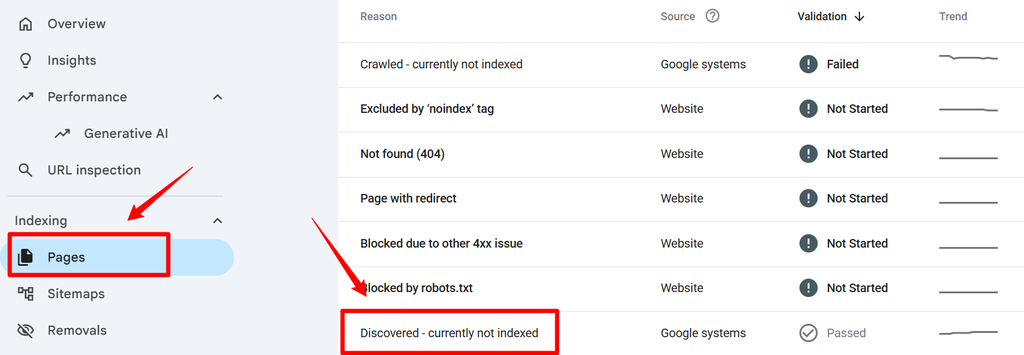
At that point, you need to figure out where the page is getting stuck.
Sometimes Google has found your URL and already crawled it, yet decided against indexing it. This issue shows up as “Crawled – currently not indexed” in the same section.
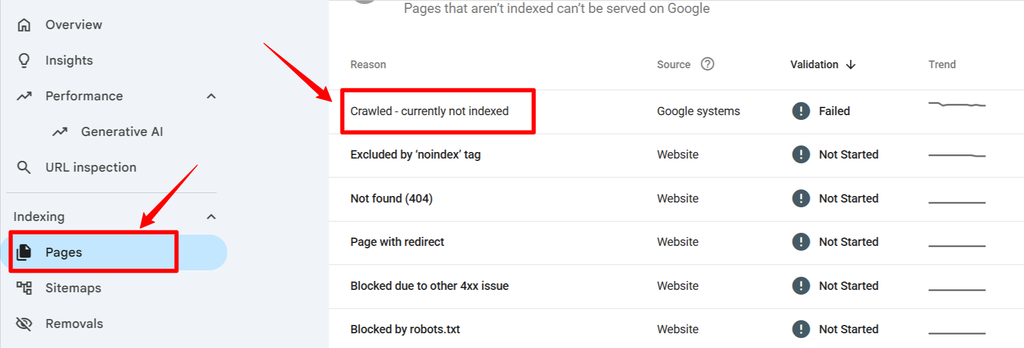
These two issues might look similar, but they usually need different fixes.
What’s the Difference Between “Discovered – Currently Not Indexed” and “Crawled – Currently Not Indexed”?
“Discovered – currently not indexed” means Google knows the URL exists but hasn’t crawled it yet. “Crawled – currently not indexed” means Google has already visited the page but chose not to index it.
Here’s what I’d check first in both scenarios.
- Discovered – currently not indexed: Internal links, sitemap inclusion, crawl paths, site structure, page importance
- Crawled – currently not indexed: Content quality, duplication, canonical setup, soft-404 signals, weak or overlapping intent
This is why I don’t treat every non-indexed page the same way.
The GSC status gives you a clue about where to start, and that’s much more useful than jumping straight into a rewrite.
How Should You Structure Your Website for SEO?
A good SEO site structure makes it easy for both people and search engines to understand what your website is about, which pages matter most, and how those pages connect.
You don’t need complex architecture. In most cases, the cleaner the structure, the better.
Your most important topics should sit near the top of the site. Supporting articles should branch out from those broader topics, and internal links should connect related pages naturally so there are no orphan pages.
Homepage → Main Topic → Pillar Page → Supporting Articles
That gives Google a much clearer picture of your content than a site where every article just exists on its own.
What Does a Good SEO Site Structure Look Like?
A strong structure usually has a clear hierarchy, logical categories, useful internal links, and no important pages buried so deep that they’re hard to reach. The table below gives you a simple way to look at this.
| Structure Element | What Good Looks Like | Common Mistake |
|---|---|---|
| Homepage | Links clearly to your main categories or important topic areas | Too many unrelated links competing for attention |
| Categories | Group closely related content under clear themes | Vague or overlapping categories |
| Pillar Pages | Cover a broad topic and point readers toward deeper supporting content | Broad pages with no connected supporting articles |
| Supporting Pages | Answer specific questions or subtopics in depth | Pages published in isolation |
| Internal Links | Connect related pages where the link genuinely helps the reader | Forced links or repetitive exact-match anchors |
| Click Depth | Important pages can be reached in a few logical steps | Valuable pages buried several layers deep |
One structure that works like a charm for content-heavy sites is the hub-and-spoke model.
The hub covers the broader subject, while the spokes go deeper into individual parts of that subject.
For instance, your hub page could be a broad guide to VPNs.
From that hub, you link out to spoke pages that cover more specific questions like best free VPNs, proxy vs VPN, or how to turn off a VPN on Android. Then those spoke pages link back to the main VPN guide where it makes sense.
How Do You Know Which Keywords Are Worth Targeting?
A keyword is worth targeting when it matches what your site can realistically help with, what the searcher actually wants, and what the page can satisfy better than the alternatives already ranking.
That means search volume alone isn’t enough.
A keyword can look attractive inside a tool and still be a bad fit if the intent is wrong, the topic is too far from your site, or you already have another page covering the same need.
This is where many sites create problems for themselves. They see five slightly different keyword variations and turn them into five separate articles. Then all five pages end up competing with each other.
If you need help finding and comparing opportunities, I’ve reviewed some of the best keyword research tools I use for SEO research.
Should Similar Keywords Share One Page or Get Separate Pages?
If two keywords mean basically the same thing and the searcher expects the same answer, they usually belong on the same page.
In simple words, here’s what I mean:
| Keyword Situation | Best Move | Why |
|---|---|---|
| Same meaning, different wording | Keep them on one page | You avoid splitting relevance across multiple URLs |
| Same topic, different search intent | Create separate pages | The reader is trying to accomplish something different |
| Broad topic + specific subtopic | Use a hub-and-spoke setup | The hub covers the big picture, while the spoke goes deeper |
| An existing page already ranks for the query | Improve the existing URL | You keep the history and signals the page has already built |
| The keyword has no clear fit with your site | Skip it | Publishing random topics weakens focus and usually creates thin content |
Search Console can help here too.
If one page is already getting impressions for several closely related queries, that’s often a sign Google sees those phrases as part of the same topic.
How Do You Know What the Searcher Wants?
Search intent is the reason behind every query.
Someone can type a perfectly clear keyword and still want something very different from what you’re planning to publish. That’s why I always look beyond the phrase itself and check what kind of result the researcher is expecting.
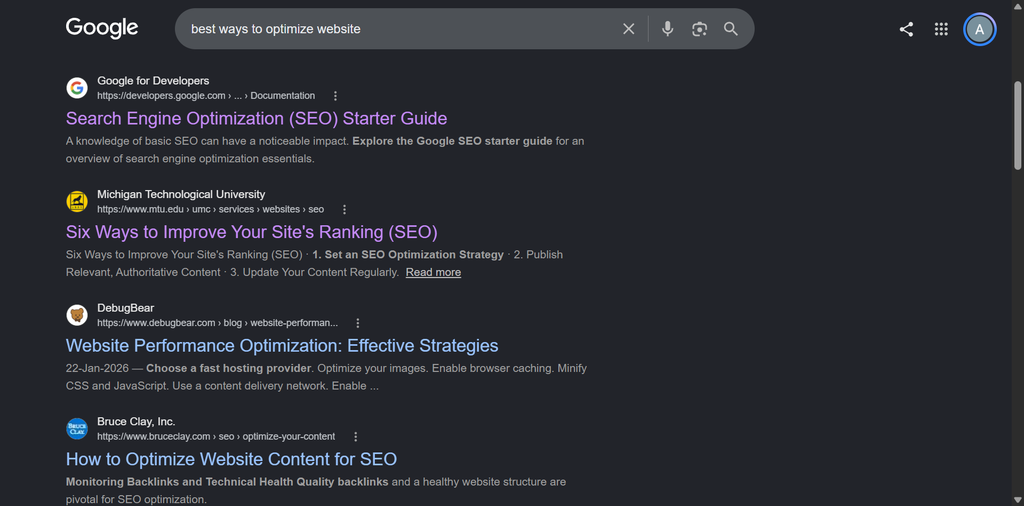
The SERP gives you clues about the format, depth, and angle that already satisfy that topic.
What Does Search Intent Look Like in the SERP?
The fastest way to understand intent is to look at the pages already ranking.
If Google is showing mostly step-by-step guides, the query is probably informational. If the results are dominated by product pages, comparison posts, or tools, the searcher is likely closer to a decision.
| What the SERP Shows | What It Usually Means | What You Should Create |
|---|---|---|
| Mostly how-to guides | Informational intent | A clear step-by-step guide |
| Product or category pages | Transactional intent | A product, service, or category page |
| “Best X” lists and comparisons | Commercial investigation | A comparison or recommendation piece |
| Definitions and explainers | Early-stage informational intent | A focused explainer |
| Tools, calculators, templates | Utility intent | Something practical the reader can use |
| Mixed result types | Broad or unclear intent | Study the query more closely before publishing |
Also, look for patterns inside the ranking pages.
What questions keep appearing? How deep are the answers? Are the top pages short and direct, or long and detailed? Are they using screenshots, tables, calculators, reviews, or examples?
Your main task here is to identify what each page is missing and incorporate it into one comprehensive guide and then some. This way you can create something better instead of just copying the shape of the SERP.
What Makes Content Good Enough to Rank?
Good SEO content answers the searcher’s question clearly, gives them something useful they didn’t already have, and makes it easy to trust what they’re reading.
That means getting to the point, covering the parts that matter, using real examples, and adding something original.
Ryan Law at Animalz calls this “sharing the alpha”: giving readers the knowledge, data, and lessons you only have because you’ve actually done the work. That’s a much stronger reason to rank than simply writing a longer version of what’s already on Google.
Length can help when the topic needs depth, but word count by itself doesn’t make a page better. A 1,200-word article that solves the problem properly can beat a 4,000-word article full of repetition.
Ask yourself one thing when writing content:
What does this page give the reader that the average result doesn’t?
That could be your own experience, original data, a clearer explanation, a better framework, updated information, screenshots, or a practical example that makes the advice easier to use.
I’ve covered several other practical SEO techniques for improving organic traffic in a separate guide.
What Should Every Strong SEO Page Actually Include?
There’s no perfect formula for every article, but the best pages usually have a few things in common:
- A Direct Answer: Don’t make the reader dig through three paragraphs before you answer the thing they searched for.
- Something Original: That could be your own data, experience, screenshots, a framework, a better explanation, or an angle the other results missed.
- Real Examples: Advice becomes much easier to trust when the reader can actually see what it looks like in practice.
- First-Hand Experience: If you’ve tested something, implemented it, or learned from it yourself, say so. That carries more weight than repeating generic best practices.
- Credible Source: Important claims should be backed by something solid, especially when you’re talking about Google, technical SEO, security, or anything that changes over time.
- Edge Cases: Good content tells the reader when the usual advice doesn’t apply.
- A Clear Next Step: The reader should know what to do after they finish the section.
If your article could be replaced by a generic summary of the top five search results, it probably needs more work.
How Do You Add Something Original to a Website?
Add something the reader can’t get from a generic summary of the pages already ranking.
That could be your own experience, original data, screenshots, a framework you use, a clearer explanation, or an edge case most other pages ignore. Even a small real example can make the page more useful than another article repeating the same advice.
A great example would be this blog. I am actively sharing my own experience that’s unique, and not many guides have that.
How Do You Optimize an Individual Page for SEO?
To optimize a page for SEO, make sure the title matches the topic, the H1 makes the purpose obvious, the URL comes out clear, and each section answers a clear part of the searcher’s problem.
Your internal links, images, and supporting elements should all help the page do its job. Don’t force keywords into every heading or chase an arbitrary plugin score.
As explained well by Michael King’s relevance-engineering approach, ”The page should be relevant as a whole, but each important section should also clearly satisfy a specific part of the user’s need.”
What Should You Optimize on the Page Itself?
Let’s look at how to optimize a page visually.
Here’s what I usually check first:
- SEO Title: Keep it clear, specific, and aligned with the query. Put the most important wording early instead of stuffing every variation into it.
- H1: Give the page one clear primary heading that tells both the reader and search engines what the page is about.
- URL: Keep it short, readable, and descriptive. Avoid unnecessary dates, random numbers, or long strings of words.
- Opening Paragraph: Answer the main question early. Don’t make someone scroll through a long setup before they understand what the page will help them do.
- H2s and H3s: Use headings to break the topic into real questions, decisions, or subtopics. Each section should have a purpose.
- Keyword Usage: Use the main topic and closely related language naturally. If the writing starts sounding strange because you’re trying to “include the keyword,” pull it back.
- Meta Description: Write it for the person scanning the SERP. Tell them what they’ll get from the page and give them a reason to click.
- Images and Alt Text: Use visuals when they actually help explain something, and describe informative images clearly in the alt text.
- Internal Links: Link to related pages where they help the reader go deeper or understand the wider topic.
- Readability: Keep paragraphs manageable, use plain language, and make the page easy to scan without stripping out the depth.
I also check the page section by section.
If an H2 says “How Does Google Discover a Page?”, the first sentence underneath should answer exactly that. The reader shouldn’t have to work for it.
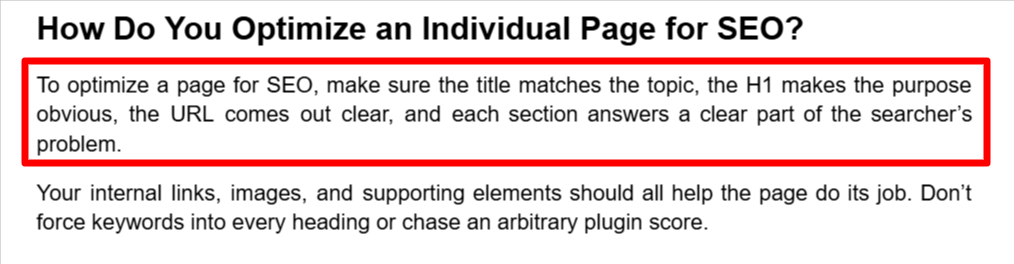
That same principle helps with AI search too. Clear headings, direct answers, and self-contained explanations make important passages easier to retrieve and understand.
For a deeper walkthrough, see my guide to on-page SEO best practices.
How Do Internal Links Help Google Understand Your Website?
Internal links help Google discover pages, understand how your content is connected, and get a clearer sense of which pages are broader, more specific, or more important within a topic.
They also help readers move through the site naturally.
That’s why I don’t treat internal linking as a box to tick after publishing. It’s part of the structure of the site itself.

A good internal link gives context. For instance, if you’re writing about website SEO and mention title tags, linking to a deeper guide on title tags tells both the reader and Google that the second page is the more specific resource.
According to Koray Tuğberk, contextual links help search systems understand relationships between documents, not just pass authority around.
Where Should You Add Internal Links?
Link from pages that are already closely related to the topic, and place the link where it actually makes sense in the sentence.
Weak Example: “Click here to learn more.”
Better Example: “If you’re working on on-page SEO, our guide to writing SEO-friendly title tags and meta descriptions goes much deeper into that part of the process.”
The second version gives the reader context before they click.
A strong hub page should link to deeper supporting pages. Those supporting pages should link back to the hub where it makes sense. And if a page is strategically important, it should have more than one weak internal link buried somewhere in the site.
What Anchor Text Should You Use?
Use anchor text that naturally describes what the linked page is about.
You don’t need the same keyword every time.
Natural variation usually reads better and gives you more context around the page.
For example:

The anchor should tell the reader what they’re about to open.
The words around the anchor matter too. A contextual sentence gives Google more information than a random standalone link stuffed into a footer or sidebar.
How Do You Find Pages That Need More Internal Links?
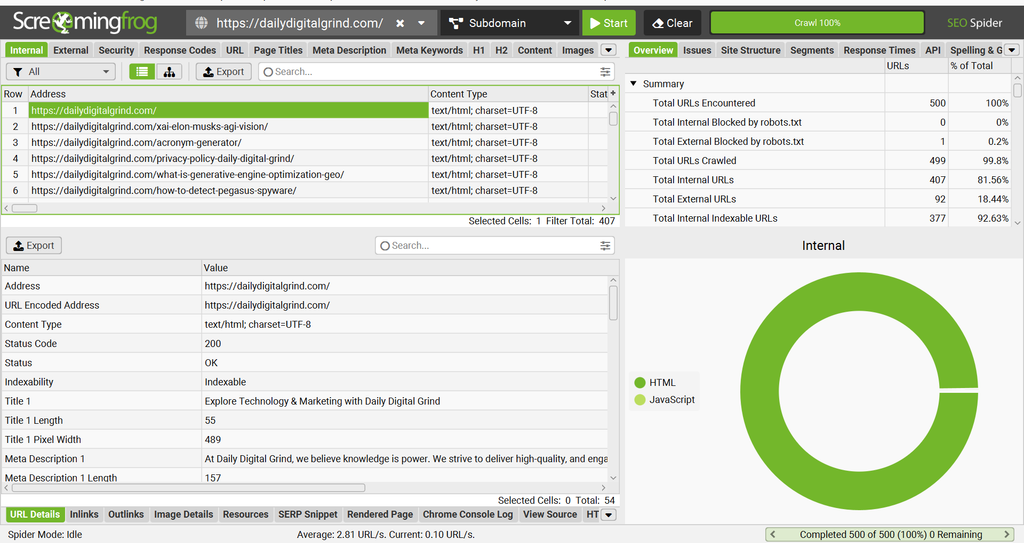
For a small site, you can do this manually. Once the site gets bigger, a crawler like Screaming Frog makes the job much easier.
I use it to look for things like:
- Pages with very few inlinks
- Orphaned or poorly connected URLs
- Internal links pointing through redirects
- Broken internal links
- Pages sitting too deep in the site
On one of my own crawls, Screaming Frog found 18 internal redirect URLs with 118 redirect instances. None of those links looked broken to a normal visitor because the redirects worked, but the crawl showed me cleanup I would’ve missed going page by page.
How Do You Optimize Images and Page Speed for SEO?
Image optimization and page speed still matter, but they’re supporting factors, not the whole game.
A fast page with weak content, poor intent match, or no topical depth still won’t suddenly become competitive. At the same time, slow pages can frustrate readers, waste bandwidth, and make the site harder to use.
Performance also affects the wider user experience. This is why monitoring how users experience a website can reveal problems that a simple speed score misses. Use Microsoft Clarity to see heatmaps, session recordings, and other user behavior.
Google’s current guidance still recommends good Core Web Vitals and a strong overall page experience, including for AI Overviews and AI Mode.
So I wouldn’t obsess over a perfect speed score.
I’d make sure the site loads cleanly, the main content appears quickly, and nothing important is breaking because of heavy scripts or poor rendering.
What Should You Optimize on Your Images?
Use descriptive file names, resize oversized images before uploading, compress them, and add useful alt text where the image needs a description.
For example, don’t upload something like: “IMG_4827.jpg”
Much better to use “google-search-console-indexing-report.jpg,” as it describes the image much better.
For image compression, use TinyPNG or Squoosh, as they are easy to use if you want to compress images before uploading them. If you’d rather handle it inside WordPress, plugins such as ShortPixel, Imagify, Slush, or EWWW Image Optimizer can automate a lot of the work.
Don’t upload a 4,000-pixel-wide image just to display it at 800 pixels in the article. Resize it first.
Does Page Speed Still Matter for SEO in 2026?
Yes, but I wouldn’t put it ahead of content quality, relevance, crawlability, indexing, or topical authority.
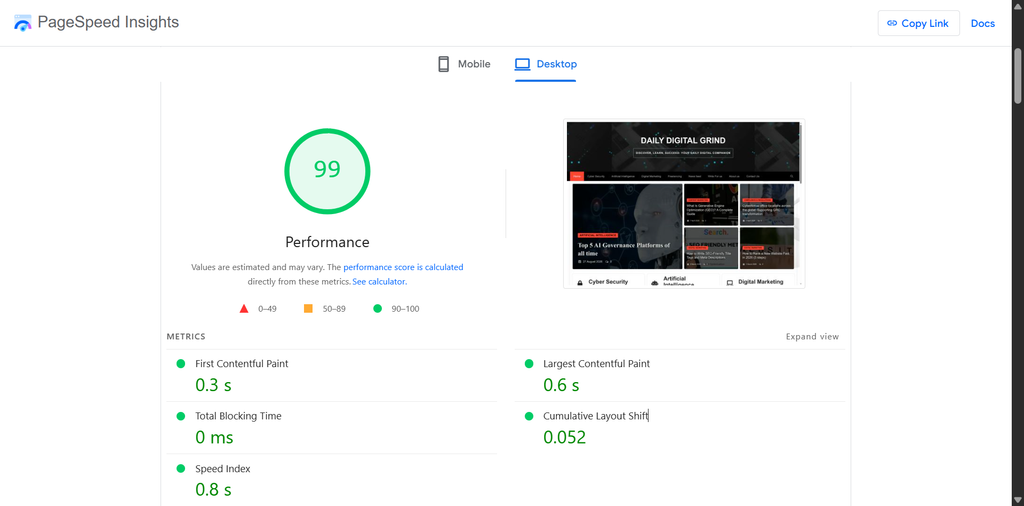
Google still uses Core Web Vitals in its ranking systems and recommends a good page experience. It also explicitly says that getting perfect scores doesn’t guarantee rankings, and chasing a perfect score purely for SEO may not be the best use of your time.
For most sites, a 90+ page speed is usually enough.
The three Core Web Vitals to know are:
- LCP: How quickly the main content loads
- INP: How responsive the page feels when someone interacts with it
- CLS: How much the layout jumps around while loading
Google currently recommends an LCP within 2.5 seconds, INP under 200 ms, and CLS below 0.1 for a good experience.
What Should You Fix First on a Slow Website?
Start with the obvious stuff before touching advanced settings.
Oversized images are usually an easy win. After that, I’d check heavy plugins, bloated themes or page builders, too many third-party scripts, poor caching, and slow hosting.
On WordPress, a caching plugin such as WP Rocket, LiteSpeed Cache if your server supports it, or W3 Total Cache can help. But don’t install three performance plugins and let them fight each other.
I’d also check the site in PageSpeed Insights before changing anything so you know where the problem actually is.
Do You Need Schema Markup for SEO?
Schema markup helps search engines understand what kind of page they’re looking at and what the main information on that page represents.
It can also make a page eligible for richer search features when Google supports them.
What schema won’t do is rescue weak content, fix poor indexing, or suddenly push a page to the top because you added a few lines of structured data.
Can Schema Improve Rankings?
No, schema can help search engines understand the page and may improve how it appears in search, but it doesn’t replace the things that actually make a page competitive.
You still need strong content, clear intent, good internal links, crawlability, indexing, and enough authority around the topic. Get the page right first, then use structured data to make the meaning clearer.
Do Backlinks Still Matter for SEO in 2026?
Yes, backlinks still matter because they can help build authority, trust, and visibility around a page or website.
For newer sites, this becomes part of the wider process of ranking a new website and building enough authority to compete.
A useful backlink usually comes from a relevant, trustworthy website and appears naturally inside content that makes sense for the topic.
The best kind of backlinks come from relevant niche-related sites with real readers and traffic. Such links send the kind of audience you’d want on your site. While building backlinks, I care much more about relevance and context than chasing a big number.
How To Earn Backlinks without Buying Them?
The easiest links to earn usually come from having something worth referencing.
That could be:
- Original data
- Useful checklist
- Comparison nobody else has done well
- Strong visual
- Detailed guide
- Quote from an expert
- Small study
- Free tool or template
You can also earn links through guest posts, resource-page outreach, journalist requests, and link reclamation when another site mentions your brand without linking.
How Important Is Topical Authority for SEO?
Topical authority matters because search engines need to understand what your site consistently knows about.
A single good article can rank, but a site that covers a topic deeply, connects related pages properly, and keeps building useful history around that subject usually has a stronger foundation.
My team and I have been actively doing this for a medical billing site, and it has been fruitful in terms of Google ranking us higher.
What Does Topical Authority Mean?
Topical authority comes from covering a subject in a way that feels complete and connected.
Start with a clear main topic, then build around it with supporting pages that answer the questions, problems, comparisons, and subtopics people naturally have around that subject. The pages should feel like parts of the same knowledge system.
Internal links help tie this system together. They show readers where to go next and give search engines more context about how the pages relate to each other.
In short, topical authority is about depth, connection, and consistency over time.
How to Build Topical Authority for a Website?
Pick one main topic you want the site to be known for, then build a strong central page around it.
If the topic is VPNs, that main page should cover the broad subject properly: how VPNs work, privacy, security, speed, use cases, and the main decisions a reader needs to make. You can name it:
“What Is a VPN? A Complete Guide for Beginners”
Then create supporting pages for the narrower questions that deserve more depth, such as Proxy vs VPN, Best Free VPNs, VPN Encryption, or How to Turn Off a VPN on Android. These pages should naturally link back to the main VPN guide and from the main guide to these supporting topics.
This structure makes the subject easier for readers, search engines, and AI systems to understand because the site shows depth.
Does AI Search Change How You Should Optimize Your Website?
Yes, but the foundation stays the same.
AI Overviews, AI Mode, and LLM-driven search still need clear, trustworthy, well-structured information they can retrieve and understand. That means crawlability, indexing, topical relevance, internal links, strong content, and authority still matter.
I wouldn’t throw out normal SEO and start chasing random “GEO hacks.”
Kevin Indig’s work makes this point well: classic SEO still gives you the retrieval foundation, while AI search adds another layer around citation and trust.
Should You Optimize Separately for AI Overviews and LLM Search?
Not from scratch.
Start with the same things that help in traditional search. Google’s own guidance on optimizing for generative AI search still points back to the same core SEO foundations: crawlability, indexability, relevance, quality, and trust.
Then make the content easier to extract.
Answer questions clearly, keep important explanations self-contained, and avoid vague sections that take five paragraphs to reach the point.
If a normal reader can understand the section quickly, an AI system has a better chance of understanding it too.
What Makes Content Easier for AI Systems to Understand and Cite?
Clear structure helps.
Use descriptive headings, answer the question directly underneath them, and explain one idea at a time.
AI systems can already summarize generic information. Your page becomes more useful when it includes something harder to replace, such as first-hand experience, original data, screenshots, a useful framework, or expert input.
Here, trust plays a major role too.
Clear authorship, strong sources, consistent coverage of the topic, and third-party mentions all help strengthen the source behind the content.
Which SEO Metrics Should You Keep an Eye On?
The best place to see if your SEO work is going in the right direction is through Google Search Console and Google Analytics. SEO tools like Ahrefs and Semrush can give you an idea, but not better than Google’s own analytics platform.
| Metric | What It Tells You | What I’d Look For |
|---|---|---|
| Impressions | How often your page appears in search | Growth in visibility before clicks arrive |
| Clicks | How much organic traffic Google is sending | Steady growth from relevant queries |
| Average Position | Where the page tends to rank | Direction of movement |
| CTR | How often people click when they see you | Weak titles, poor intent match, or crowded SERPs |
| Indexed Pages | How much of the site Google is keeping in the index | Recovery or decline in important URLs |
| Conversions | What the traffic actually produces | Leads, sales, signups, or affiliate actions |
| Branded Searches | How often people search for your name directly | Growing recognition and trust |
| AI Visibility | Where your content appears in AI-driven results | Citations, mentions, and referral trends |
One reason I wouldn’t judge SEO by clicks alone anymore is the rise of AI Overviews. Research done by Ahrefs found that the presence of an AI Overview correlated with a 58% lower average CTR for the top-ranking page.
How Long Should You Wait Before Judging a Change?
For most meaningful updates, look at 30, 60, and 90-day windows instead of reacting to every small movement. That will give you enough time to see if the trend is real.
You also need to account for outside noise.
A Google update, seasonality, or a sudden change in search demand can make a good page look worse for a while. For example, the Google Spam Update in August 2026, which decreased visibility and impressions for many thin sites.
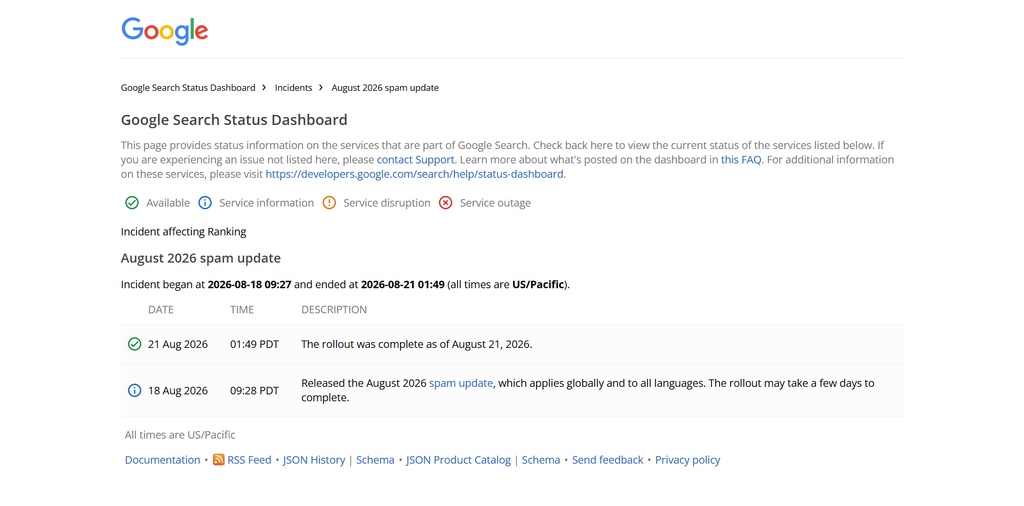
If nothing works, check if Google actually crawled the page after the update. Look at the queries it’s showing for and see if they match the page you intended to create. In the end, check content quality, internal links, search intent, site structure, authority, and the current SERP.
Can You Do SEO without Hiring an Agency?
Definitely, you can do a lot of the SEO work yourself, especially if you’re working on a small or mid-sized website.
Where people usually get stuck is trying to do everything at once or relying too heavily on tools. An SEO plugin can point out issues, but it can’t decide which pages deserve to be rewritten, which topics are worth building, or why a page is losing visibility.
There are times when outside help makes sense. Complex migrations, serious technical crawl problems, large ecommerce sites, JavaScript-heavy websites, or major traffic losses may need a specialist.
For most site owners, you can make meaningful progress yourself if you’re willing to learn the basics and avoid random fixes.
What Do I Wish I Had Known Two Years Ago?
I wish I had understood earlier that SEO is much easier when you stop treating every problem like a content problem.
Sometimes the page doesn’t need another 1,000 words. It needs to be crawled. Sometimes it doesn’t need more backlinks. It needs better internal links. Sometimes the content is fine, but the search intent is wrong.
I’d also spend less time worrying about word count and more time asking a harder question:
What does this page give the reader that they can’t get from the average result?
That could be first-hand experience, original data, a clearer explanation, a better example, or a useful framework.
And finally, I wish I had been more patient with measurement.
SEO rarely gives you a clean result overnight. Some changes show up in crawling first, then indexing, then impressions, and only later in rankings or clicks.
That’s the checklist I’d follow now.