
Grammarly is hard to ignore when looking for a writing assistant. The company says more than 40 million people and 50,000 organizations use Grammarly, and its free plan already handles basic spelling, grammar, and tone feedback.
This means the free Grammarly alternatives have to do more than simply underline obvious typos to be worth switching to. A tool can advertise grammar checking, readability, rewriting, and AI assistance, but that does not tell you how many real mistakes it catches.
So, for this comparison, I focused on five Grammarly alternatives. Each one was tested using the same writing samples, including deliberately planted grammar and punctuation mistakes, awkward sentences, and natural conversational writing.
My only goal is to help you guys find which free alternative to Grammarly is genuinely useful for everyday writing.
How I Tested the 5 Grammarly Alternatives
To keep the comparison fair, I used the same writing samples in every tool. I didn’t rewrite a sentence between tests or change errors to match a particular checker.
The test included five different types of writing:
- Grammar and Spelling: Subject-verb agreement, tense mistakes, misspellings, missing articles, and repeated words.
- Punctuation: Missing commas, apostrophe errors, run-on sentences, and other punctuation issues.
- Awkward Writing: Sentences that were technically understandable but unnecessarily wordy or clumsy.
- Natural Conversational Writing: Correct sentences with contractions and varied sentence structure, used to see if a tool produced unnecessary corrections.
- Real-World Editing: A section from an actual DDG article draft to see how useful each tool felt when editing evergreen content for publication.
For the controlled test, I deliberately inserted a fixed number of errors so I could measure more than the score or number of suggestions a tool displayed.
I recorded:
- Errors Caught: Mistakes the tool correctly identified.
- Errors Missed: Planted mistakes it failed to flag.
- False Positives: Correct wording the tool incorrectly suggested changing.
- Useful Clarity Suggestions: Recommendations that genuinely improved the sentence.
- Free-plan Limitations: Word limits, locked suggestions, sign-up requirements, and other restrictions that affected normal use.
Writing score is useless if following the recommendation actually makes the copy worse. I found the same problem when testing headline analyzer tools. The score itself matters less than the quality of the recommendation behind it.
So, for this, I also used Grammarly Free as the control. That gives us a direct comparison instead of simply asking which alternative looks best on its own.
Grammarly Alternatives Compared: Quick Results
The table below shows the real results of the Grammarly alternatives that I tested. This is just Test 1.
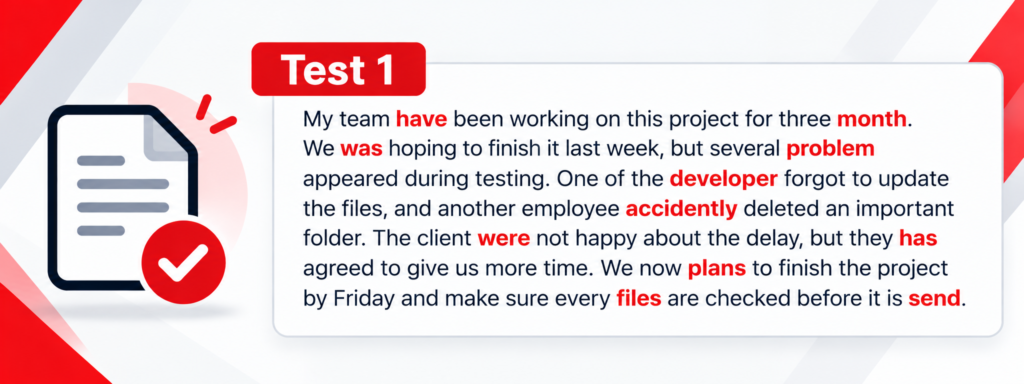
| Tool | Errors Caught /11 | Errors Missed | Test 1 Verdict |
|---|---|---|---|
| Grammarly Free | 11/11 | None | Excellent |
| LanguageTool | 11/11 | None | Excellent |
| QuillBot | 11/11 | None | Excellent |
| Scribens | 11/11 | None | Excellent |
| ProWritingAid | 10/11 | “they has” | Very good |
| Trinka | 11/11 | None visible | Excellent |
For Test 2, the following text was used, and the results are compiled in the table ahead. I kept some punctuation and apostrophe errors deliberately to test how the tools identify these little mistakes.
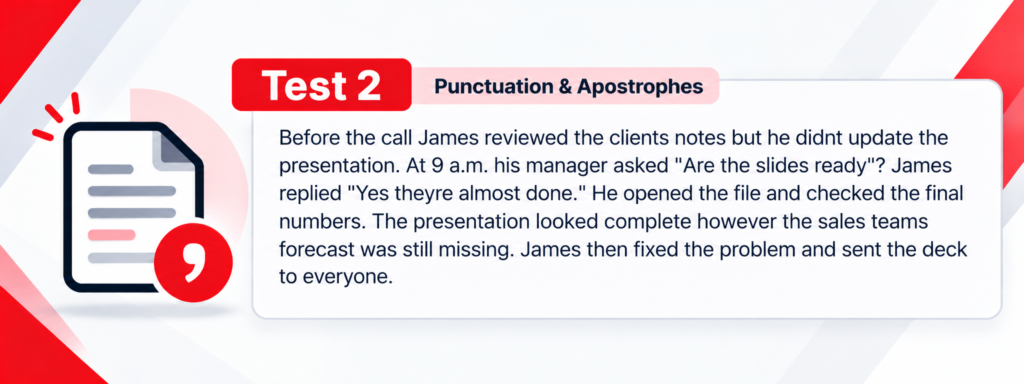
| Tool | Punctuation Test | What Stood Out |
|---|---|---|
| Grammarly Free | 10/10 | Caught all planted punctuation/apostrophe problems; also gave an extra clarity suggestion |
| QuillBot | 10/10 | Showed 8 correction cards, but some bundled two errors into one correction, such as punctuation around however |
| Scribens | 10/10 | Flagged all the problem areas clearly |
| ProWritingAid | 7/10 | Appears to miss the misplaced question mark and both punctuation issues around however |
| LanguageTool | 7/10 | Only showed 6 correction alerts; missed several dialogue/contraction issues, though its however correction appears to cover both punctuation marks |
| Trinka | 0/10 | Said “No language issues found” despite the paragraph containing 10 deliberate errors |
For Test 3, we stopped planting grammar mistakes. This time the paragraph was 100% grammatically correct, but intentionally wordy and awkward.
It’s the last test we used, and it was enough to see which tool is the right fit and can actually be used as an alternative to Grammarly.
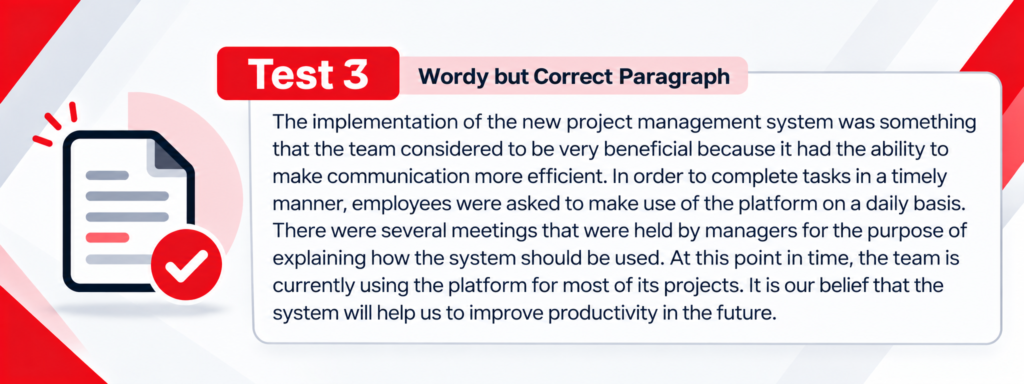
| Tool | Useful Clarity Fixes /7 | Bad / Unhelpful Changes | What Happened in the Free Version |
|---|---|---|---|
| Grammarly Free | 4/7 | 0 | Strongly simplified the first two sentences, but left the wordy meetings sentence, At this point in time… currently, and It is our belief that… |
| ProWritingAid | 4/7 | 1 | Made several substantial rewrites, including the meetings sentence and redundancy, but considered being very beneficial is awkward/worse |
| Scribens | 1/7 | 0 | Made a small improvement by removing that were from the meetings sentence, but left most wordiness untouched |
| LanguageTool Free | 0/7 | 0 | Made no free corrections; importantly, it detected 4 advanced issues but locked them behind Premium |
| QuillBot Free | 0/7 direct fixes | 0 | Gave low Fluency (48) and Clarity (61) scores, so it recognized weakness, but offered no direct free corrections in this test |
| Trinka Free | 0/7 | 0 | Reported 0 alerts / no language issues found despite the deliberately wordy writing |
After checking grammar and clarity, I also use the free headline analyzer for a quick headline check because headline quality and sentence-level grammar are different problems.
What Did the Tests Show?
The biggest surprise was how little difference there was in the basic grammar test. Grammarly, QuillBot, Scribens, LanguageTool, and Trinka all caught all 11 deliberately planted grammar mistakes. ProWritingAid missed only one.
The differences became much clearer once I moved beyond basic grammar.
In the punctuation test, Grammarly, QuillBot, and Scribens caught all 10 issues. LanguageTool and ProWritingAid missed several, while Trinka returned no alerts at all despite the paragraph containing deliberately incorrect apostrophes, quotation punctuation, and sentence punctuation.
The clarity test produced another completely different result. Grammarly and ProWritingAid were the only tools that made several meaningful improvements to writing that was grammatically correct but unnecessarily wordy.
That is closer to sentence rewriting than traditional proofreading because the problem is not an incorrect sentence. It is a sentence that could simply be clearer and shorter.
QuillBot recognized that the passage had weak fluency and clarity, but its free version did not give me comparable direct fixes. LanguageTool detected advanced issues but placed them behind its Premium plan, while Scribens made only a small improvement.
That matters because a grammar checker can perform perfectly on obvious errors and still be much less useful when editing a real article. Grammar accuracy, punctuation accuracy, and writing improvement are three different things.
Do Independent Tests Find the Same Problem?
My test was small and controlled, so I also wanted to see how these results compared with independent research.
A 2026 study published in the Journal of Second Language Writing found a similar limitation when researchers compared Grammarly with human reviewers.
Grammarly was highly accurate when correcting the errors it did identify, but its recall rate was only 51%, meaning it missed almost half of the sentence-level issues the human annotators identified.
That does not mean Grammarly catches only half of all writing errors in every situation. The result came from a specific dataset and study design. But it does reinforce an important point that a writing tool can be accurate about the problems it finds while still missing problems.
Which Grammarly Alternative Should You Choose?
There is no single free tool that performs best in every category. Some tools were better at catching straightforward grammar and punctuation errors, while others were more useful when the writing was technically correct but still too wordy or awkward.
So the best choice depends on what you actually need help with. Here is the simplest way to choose based on my testing:
| If You Need… | My Pick | Why |
|---|---|---|
| Best overall free Grammarly alternative | QuillBot | Matched Grammarly in grammar and punctuation testing |
| Simple free proofreading | Scribens | Caught all grammar and punctuation errors in my tests |
| Help improving wordy writing | ProWritingAid | One of only two tools that made several useful clarity edits |
| Basic grammar checking | LanguageTool | Perfect basic grammar score, though more advanced feedback was paywalled |
| Academic/technical-focused checking | Trinka | Strong basic grammar performance but inconsistent in broader testing |
Can a Free Grammarly Alternative Actually Replace Grammarly?
The testing showed that several free tools can match Grammarly when the job is straightforward. QuillBot and Scribens caught every grammar and punctuation error in my controlled tests, while LanguageTool also performed well on basic grammar.
The gap appeared when the writing was already grammatically correct but still needed improvement.
Grammarly and ProWritingAid were much better at identifying wordiness and making useful clarity changes, while several of the other free tools either offered limited suggestions or placed deeper feedback behind a paid plan.
So, yes, you can replace Grammarly Free if you mainly need grammar, spelling, and punctuation checking. QuillBot is the strongest option from my testing for that purpose.
If the writing is going on a webpage, proofreading is only one layer. The SEO title and meta description still need to communicate the topic clearly enough for someone to understand why they should click.
My Verdict: What Is the Best Free Alternative to Grammarly?
Based on my three tests, QuillBot is the best free Grammarly alternative overall.
It matched Grammarly Free in both the grammar and punctuation tests, catching all 11 grammar errors and all 10 punctuation mistakes I deliberately planted. That made it the strongest direct replacement for someone who mainly wants help catching everyday writing errors.
Scribens came surprisingly close. It also caught every grammar and punctuation issue in those two tests, which makes it a very solid choice. Its weakness showed up in the clarity test, where it did much less to improve writing that was technically correct but still awkward or wordy.
Grammarly still had the best overall balance across all three tests, especially once clarity entered the picture. But for basic grammar and punctuation, my testing showed that you can get very close to Grammarly Free without using Grammarly at all.
FAQs
What Is the Best Free Grammarly Alternative?
Based on my testing, QuillBot was the best free Grammarly alternative overall. It matched Grammarly Free by catching all 11 grammar errors and all 10 punctuation mistakes in the controlled tests.
Is QuillBot Better Than Grammarly?
For basic grammar and punctuation, QuillBot performed just as well as Grammarly Free in my tests. Grammarly was stronger when the writing was already correct but needed clarity improvements, so QuillBot is a strong free replacement for proofreading but not necessarily for deeper editing.
Is There a Completely Free Grammar Checker?
Yes. Tools like QuillBot, Scribens, LanguageTool, ProWritingAid, and Trinka all offer free grammar-checking features. The main difference is how much advanced feedback they provide before asking you to upgrade.
Is Grammarly Still Worth Paying For?
It can be if you rely heavily on advanced clarity, rewriting, tone, and style suggestions. If you mainly use Grammarly to catch grammar, spelling, and punctuation mistakes, my testing showed that free tools such as QuillBot and Scribens can cover a lot of the same basic needs.
Which Free Grammar Checker Is Best for Simple Proofreading?
Scribens was one of the strongest options for straightforward proofreading. It caught every grammar and punctuation error in my first two tests, although it was much less useful when the writing needed deeper clarity improvements.
Which Grammarly Alternative Is Best for Improving Wordy Writing?
ProWritingAid performed best among the alternatives in the clarity test. It made several useful changes to awkward and wordy sentences, although it also produced one rewrite I would not have accepted, so its suggestions still need human review.