
According to Gartner, the AI inference costs per agentic workflow will increase more than fivefold through 2028. The weird part is that this could happen even as individual model prices keep getting cheaper.
A feature that once needed one prompt and one response can now search the web, retrieve data, call other tools, check its own output, and try again when something goes wrong. Every step can add another billable event.
That makes the $5 or $20 you see next to “per million tokens” a pretty poor way to decide if your SaaS idea is financially viable.
Use the DDG AI SaaS Cost Calculator to estimate your cost per AI action, cost per customer, and expected monthly API bill before you start building.
Calculate My AI API CostsBefore building, you need to know what one useful action will actually cost, what one active customer could cost you each month, and what happens when 1,000 users start clicking that button instead of one.
I’ll also show you a fun way to run your assumptions past 100 simulated customers, because the biggest variable in your API bill may not be the model at all.
Start with the cost of one useful AI action, then scale that across your expected customer usage.
For a token-priced model:
For instance, if one AI action costs $0.0065, an average customer uses that feature 100 times per month, and you have 1,000 active customers, your estimated monthly AI cost would be:
What Actually Determines Your AI API Cost?
Your AI API bill mainly depends on how much you can send to the model (input tokens), how much it generates back (output tokens), and how many calls happen behind one user action. In fact, two SaaS apps can use the same model and still have very different costs.
A title generator may send a short prompt and return a few words, while a research tool may process documents, search for information, and make several model calls before producing a report.
How Much Do Input and Output Tokens Cost?
Input tokens are everything your app sends to the model, including the user’s prompt, system instructions, conversation history, uploaded text, and retrieved context.
Output tokens, on the other hand, are what the model generates back.
A short classification may use very few tokens, while a long report may use thousands. Output tokens are also often priced higher than input tokens, so response length can have a noticeable effect on cost.
How Do You Estimate Token Usage Before Building Your SaaS?
You do not need a finished product to estimate token usage. You just need to map out what one normal customer action is likely to send to the model and what you expect the model to send back.
Before launch, that is impossible. You are trying to build a realistic baseline that you can later replace with actual usage data.
A simple way to do that is to break one AI action into four parts:
- System instructions
- User input
- Additional context
- Expected output
Once you estimate those pieces, you can calculate the approximate cost of one request.
What Should You Count as Input Tokens?
Input tokens include everything your application sends to the model before it generates a response.
That can include far more than the text the customer types.
For a document-based SaaS, a single request might contain:
- A 500-token system prompt;
- 2,000 tokens from an uploaded document;
- A 100-token user instruction;
- 400 tokens of extra context from previous messages or retrieved data.
That gives you an estimated 3,000 input tokens before the model has generated anything.
Here is what that looks like:
| Input Component | Estimated Tokens |
|---|---|
| System instructions | 500 |
| Uploaded or retrieved content | 2,000 |
| User request | 100 |
| Additional context | 400 |
| Total input | 3,000 |
This is a much better estimate than looking only at the user prompt and assuming the request is tiny.
How Do You Estimate Output Tokens?
Now estimate how much text the model is expected to generate.
You do not need to guess the absolute maximum. Think about the response your product is designed to return most of the time.
For example:
- A classification might use fewer than 100 tokens;
- A rewritten paragraph might use 200–500;
- A detailed support response might use 500–800;
- A long report could easily run into thousands.
For our example SaaS, let’s assume the model generates an 800-token response.
That gives us:
- Input: 3,000 tokens
- Output: 800 tokens
Those two numbers are enough to start estimating the core model cost.
What Does a Realistic Pre-Build Estimate Look Like?
Let’s say you are building an AI document summarizer.
A normal customer uploads a document, asks for the main points, and receives a structured summary.
Your first estimate could look like this:
| Component | Estimated Tokens |
|---|---|
| System prompt | 500 |
| Document text | 2,000 |
| User instruction | 100 |
| Extra context | 400 |
| Total input | 3,000 |
| Expected output | 800 |
That is now your baseline request.
It does not mean every customer will use exactly 3,000 input tokens and 800 output tokens. Some requests will be smaller, and some will be much larger.
But this gives you something concrete enough to price.
How Do You Calculate the Cost of One AI Request?
Once you know your estimated input and output tokens, the calculation is straightforward.
For token-priced models, use two separate formulas:
- Input cost = Input tokens ÷ 1,000,000 × Input price per million tokens
- Output cost = Output tokens ÷ 1,000,000 × Output price per million tokens
Then add the two together.
Cost per request = Input cost + Output cost
You should keep input and output separate because providers usually price them differently. For the example we built in the previous section, one request uses:
3,000 input tokens
800 output tokens
To keep the example simple, assume the model charges:
$1 per million input tokens
$5 per million output tokens
These are example prices for demonstrating the calculation. When you model your own SaaS, replace them with the current pricing for the model you actually plan to use.
How Do You Calculate the Input Token Cost?
Start with the 3,000 input tokens.
3,000 ÷ 1,000,000 × $1 = $0.003
So the input portion of that request costs $0.003, or three-tenths of a cent.
That includes all the context we estimated earlier: the system prompt, uploaded content, user instruction, and additional context sent to the model.
How Do You Calculate the Output Token Cost?
Now calculate the 800 output tokens.
800 ÷ 1,000,000 × $5 = $0.004
The generated response therefore costs $0.004, or four-tenths of a cent.
Notice something important here: the model generated far fewer output tokens than it received as input, but the output still costs more because our example pricing charges a higher rate for generated tokens.
That is why you should never estimate AI costs using total tokens alone. A 1,000-token input and a 1,000-token output do not necessarily cost the same amount.
What Does One Complete AI Request Cost?
Now combine the two parts:
- Input cost: $0.003
- Output cost: $0.004
Total model cost = $0.007 per request
In normal language, that is about seven-tenths of one cent every time a customer completes this action.
At first glance, that sounds almost irrelevant.
Even 100 requests would cost only:
100 × $0.007 = $0.70
But SaaS economics get interesting when the same action repeats across hundreds or thousands of customers.
If 1,000 customers each trigger that feature 100 times per month:
1,000 × 100 = 100,000 requests
Then:
100,000 × $0.007 = $700 per month
The API did not suddenly become more expensive. The tiny per-request cost simply multiplied. At that scale, AI cost optimisation software can also help identify which models, requests, or workflows are responsible for most of the spend.
Should You Include Tool Costs at This Stage?
Yes, if the feature needs them to work.
Suppose our document summarizer also uses an OCR service that costs an average of $0.003 per document.
The real direct cost becomes:
Model cost: $0.007
OCR cost: $0.003
Total direct cost per action = $0.010
And if the workflow also uses search, speech processing, embeddings, or another paid API, those should be added as separate line items.
A useful formula for a real SaaS feature is therefore:
Cost per completed action = Model calls + Tool costs + External API costs
How Do You Calculate AI Cost Per Customer?
Once you know the cost of one completed AI action, the next step is to estimate how often one active customer will use it in a typical month.
The formula is simple:
Monthly AI cost per customer = Cost per completed action × AI actions per customer per month
Using the example from the previous section, one completed action costs:
$0.007
Now assume an average customer uses that feature 80 times per month.
$0.007 × 80 = $0.56
That means one active customer would generate an estimated $0.56 in direct model cost per month.
What Does One Customer Cost Per Month?
At 80 actions:
80 × $0.007 = $0.56 per customer per month
If that customer makes 20 requests instead:
20 × $0.007 = $0.14
If they make 300:
300 × $0.007 = $2.10
The model did not change.
The user behavior did.
That is why usage assumptions can matter just as much as API pricing when you are deciding if a SaaS idea makes financial sense.
What Percentage of Your Subscription Price Goes to AI?
Now compare the AI cost with what the customer actually pays you.
Suppose your SaaS costs:
$15 per month
And the average customer’s direct AI cost is:
$0.56 per month
The calculation is:
$0.56 ÷ $15 × 100 = 3.7%
So direct AI usage consumes about 3.7% of that customer’s subscription revenue.
That sounds comfortable, but remember that the remaining 96.3% is not profit.
You may still need to pay for:
- Payment processing
- Hosting
- Databases
- Storage
- Analytics
- Customer support
- Marketing
- Salaries
- Taxes
- Third-party APIs.
The point of this calculation is simply to isolate how much of your revenue the AI feature itself is consuming. And once the product starts storing customer accounts, prompts, uploaded files, and business data, SaaS security becomes another operating requirement even though it is separate from the model bill.
Why Is Cost Per Customer More Useful Than Your Total API Bill?
Imagine your monthly AI bill is $1,000.
On its own, that number tells you very little.
If you have 10,000 paying customers, the cost may be tiny relative to revenue.
If you have 200 customers paying $10 each, the same API bill could be disastrous.
Cost per customer gives the bill context.
It also helps you compare different pricing plans.
For example:
| Plan | Monthly Price | Estimated AI Cost/User | AI Cost as % of Revenue |
|---|---|---|---|
| Starter | $9 | $0.30 | 3.3% |
| Pro | $15 | $0.56 | 3.7% |
| Heavy User | $15 | $2.10 | 14.0% |
Your average customer might look extremely cheap, while a smaller group of power users could consume several times more AI than everyone else.
And if your plan promises unlimited usage, those users may be exactly the customers most attracted to it.
So before scaling this calculation to thousands of customers, we need to stop pretending that everyone will behave like the average user.
Bonus: Let 100 Fake Customers Test Your SaaS App and Cost Assumptions
For anyone who’s reading till now, here’s a bonus for you guys. This Claude Skill can help you test your SaaS app with 100 fake customers and see if it’s viable. It’ll help you understand if your SaaS app is gonna fail or be a winner.
Most of the time, founders assume the average customer will run 80 AI actions per month.
What if the people who actually want your SaaS plan use it five times a day? What if they regenerate every answer three times? What if the feature you thought would be occasional becomes the main reason they subscribe?
You cannot know that perfectly before launch, but you can at least attack your assumptions before spending months building around them.
Here’s how.
What Is the Founder Skill for Claude?
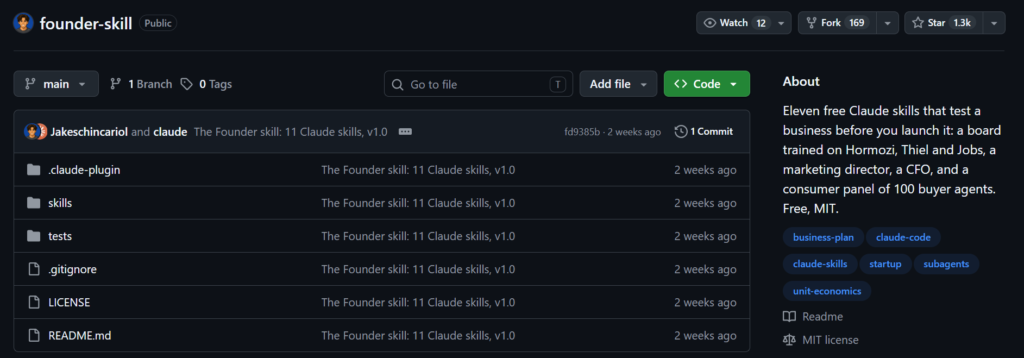
Founder Skill is an open-source collection of Claude skills created by Jake Schincariol for testing business ideas before launch.
One of those skills, /founder-consumer, creates a simulated consumer panel made up of 100 buyer agents by default.
Instead of asking one AI persona if your idea sounds good, the skill builds multiple simulated buyers with different incomes, habits, and objections. It runs the business through separate buyer scenarios.
It then tallies who would buy, who would pass, why they said no, and what might change their decision.
If the same objection keeps appearing across different simulated buyers, the problem may be your product positioning rather than the underlying product itself.
How Do You Install The Founder Skill?
The easiest method listed by the creator is almost absurdly simple.
Open Claude and paste:
“https://github.com/Jakeschincariol/founder-skill. Install skill”
You can also clone the repository and put the skill folders directly inside Claude’s skills directory if you want the shorter /founder-consumer command.
The project itself requires no separate signup or API key, and its helper scripts use standard-library Python rather than adding a pile of extra dependencies.
How Does the 100-Buyer Consumer Panel Work?
When you run the Founder Skill, it first defines the customer you are trying to reach. It creates a customer profile containing things such as:
- Target Customer: Who specifically might buy this?
- Segments: Different groups within that audience.
- Income: A range rather than giving everyone the same budget.
- Behaviors: Loyal buyer, comparison shopper, deal hunter, heavy user, and so on.
- Objections: The reasons this type of customer might say no.
- Habits: Everyday context that makes each persona less generic.
The skill explicitly tells Claude to use real information you provide about your market when possible. If you have customer interviews, survey responses, existing reviews, or competitor research, those should take priority over invented assumptions.
Next comes the pitch.
Every buyer receives the same short description containing the product, price, where to get it, and any offer you are testing.
Then the system creates the buyer cards.
By default, it generates 100 buyers. A quick run uses 20.
Instead of one model pretending to be 100 people in one response, the skill creates separate buyer briefs and uses individual Claude sub-agents to respond to them. The full 100-person test is run in waves, usually around 10 agents at a time.
Is There an Actual Example of It Working?
The repository includes a complete worked example built around a matcha café in Toronto selling $6.50 iced matcha lattes. Their target audience was urban professionals aged roughly 24 to 38 who regularly buy coffee.
The consumer skill creates the panel and returns objections such as customers already having a more convenient coffee shop or feeling that $6.50 is too expensive for a drink.
Those responses then feed into pricing and offer testing.
The demo then runs the café through its CFO model. It estimated $4.76 earned per cup after direct costs, 186 cups per day to break even, about $93,926 in first-year operating profit, and the startup investment paid back by month eight.
FAQs
How Accurate Can an AI API Cost Estimate Be Before Launch?
A pre-launch estimate will never be exact because you do not yet have real usage data. The goal is to get within a sensible range by estimating normal requests, heavier users, retries, and tool usage. Once your beta users arrive, replace those assumptions with actual token and request data.
Should You Include Free API Credits in My SaaS Cost Estimate?
I would not build your unit economics around promotional credits. Treat free credits as temporary savings rather than part of the long-term cost of serving a customer. Your SaaS should still make financial sense once those credits disappear.
Should I Estimate Costs Using Registered Users or Active Users?
Use active users.
A SaaS might have 10,000 registered accounts while only 1,500 customers actually trigger AI features in a given month. API costs are driven by usage, not account creation. For an even better estimate, calculate usage separately for free, paid, and heavy users.
What AI Usage Data Should I Track After Launch?
At minimum, track:
- Input tokens
- Output tokens
- Number of model calls
- Retries
- Tool calls
- Cost per completed feature
- Cost per active customer
That lets you replace your pre-launch guesses with real numbers and quickly identify expensive features or user groups.
How Often Should I Recalculate My AI SaaS Costs?
Recalculate whenever you change models, prompts, agent workflows, pricing plans, usage limits, or major product features. During an early beta, it is also worth checking costs frequently because your original assumptions about customer behavior can change very quickly.
What Happens If AI Model Prices Change After I Launch?
Your margins change with them, so avoid designing a business that only works at one exact API price. Keeping healthy margins, tracking costs by feature, and making it possible to switch or route between models gives you more room to adapt if provider pricing changes.