
WhatsApp is exploring a new feature called Group Member Tags, which helps users add short, personalized identifiers to their names in group chats. Currently in development, this option has appeared in the Android beta version 2.25.17.42, and was first spotted by the feature‑tracker WABetaInfo.
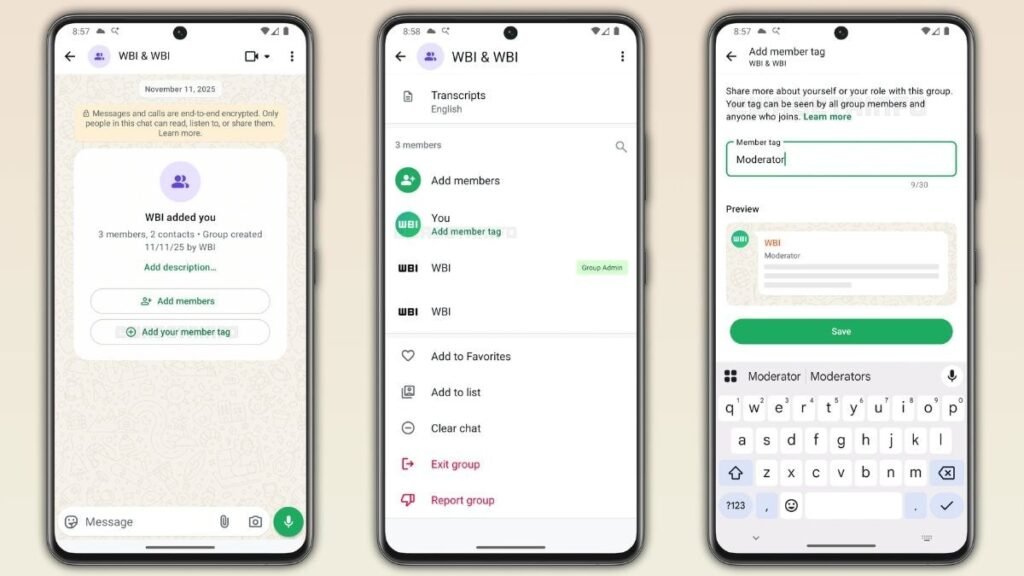
What Exactly Are Group Member Tags?
Group member tags in WhatsApp allow users to add a personal label to themselves within a group. These tags help indicate roles, hobbies, or interests, making group interactions clearer and more organized.
- Members can assign a custom tag (up to 30 characters) to themselves within a specific WhatsApp group.
- Tags can reflect roles or hobbies for example, “Project Manager”, “Coach”, “Moderator”, or even “Designer”.
- These tags are self‑managed, meaning only each individual user can create or edit their own tag; group admins do not have control over member tags.
- Certain characters are disallowed: no special symbols, checkmarks, links, or emojis are allowed in tags, likely to prevent misuse or impersonation.
- Importantly, these tags are tied to the group where they’re set, and will not appear in other chats.
- Once a tag is assigned, it persists even after reinstalling WhatsApp or switching devices, as long as the user logs into the same account.
Why This Feature Matters for Group Chats
Group Member Tags could be very useful for large or structured group chats like project teams, community groups, student societies, or volunteer organizations. In such settings, knowing who is responsible for what helps improve communication and efficiency.
Instead of relying on long bios, nicknames, or pinned messages to define someone’s role, these tags give immediate clarity. For instance, if someone tags themselves “Event Coordinator,” others know exactly whom to approach for event-related tasks.
How to Use the Feature (For Beta Testers)
For those enrolled in the Android beta program and running version 2.25.17.42, here is how you can add or edit your group tag:
- Open WhatsApp and go into the target group chat.
- Open the Group Info screen.
- Tap on your own name in the list of participants.
- Enter your desired tag in the available field.
- Press Save and your tag will now show next to your name for everyone in that group.
Availability & Future Prospects
Right now, the feature is limited to select beta testers on Android. According to reports, WhatsApp is actively refining the feature, and a broader rollout may arrive once the testing phase stabilizes.
There’s no confirmed date yet for a full public release, but WhatsApp’s move signals a continued focus on improving group interaction tools following other recent features like enhanced admin controls and better notification settings.
Final Thoughts
Group Member Tags are a smart, low-friction way to bring structure and meaning to group chats. While small, this update could make a big difference especially in large, role-based groups by helping members quickly understand who does what. As WhatsApp continues to evolve, features like this underline its effort to streamline communication and collaboration.
To explore more insights like this, visit our Digital Marketing Page. If you’re passionate about trends in tech and advertising, Write for Us and share your voice with our audience.