
The login process for a Notion account is intentionally simple, whether you want to sign up for a free account or access an existing one. From experience, once your login method is set, switching between devices becomes effortless. Notion allows secure access through web browser login, the desktop app, and mobile apps, all of which sync your workspaces automatically.
This flexibility is useful when handling multiple accounts or managing projects linked to multiple email addresses, especially if you work across different roles or organizations.
Web Login Process
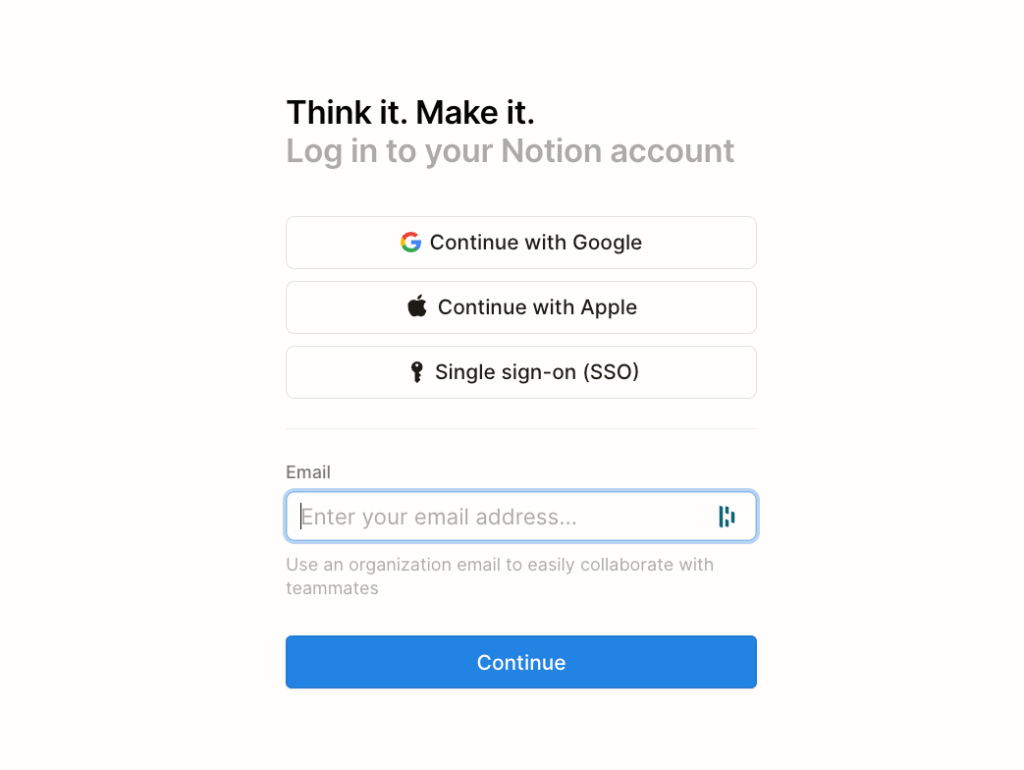
Using web browser login is the fastest way to access Notion on any device.
- Open your browser and go to notion.so/login.
- Choose a login method: Google login with a Gmail account, Apple login with an Apple account, or email login.
- If your organization uses single sign-on, select SSO login.
- Enter the required login code, verification code, or click the magic link sent to your email.
- Once verified, you gain instant account access to your selected workspaces.
This method is reliable and works well even when switching between personal and professional setups.
Desktop Login Process
For daily use, the desktop app provides a more stable experience, especially during long work sessions.
- Download the app from notion.so/desktop.
- Install either the MacOS app or Windows app.
- Open the app and log in using Google login, Apple login, email login, or SSO login.
- Confirm using a verification code or magic link.
- Use the workspace menu in the sidebar to add another account or switch between workspaces.
Mobile Login Process
The mobile login flow mirrors the desktop experience and is useful when managing tasks on the go.
- Install the Notion app from the App Store or Play Store.
- Open the app and choose your login method (Google login, Apple login, or email login).
- Enter the login code or tap the magic link.
- Access synced workspaces instantly.
Mobile access is especially helpful when reviewing shared notes or tracking tasks during travel.
Common Login Issues and How to Fix Them
Even a smooth system can face login issues, and knowing quick fixes saves time.
- Incorrect credentials: Double-check email password details and ensure the correct login method.
- Account suspension: Review Notion’s terms of service if access is restricted.
- Technical problems: Temporary outages may occur due to Notion servers.
- Internet connection: Weak or unstable networks can block verification.
- Browser issues: Old cookies and cache may interfere with clear browser cache to resolve this.
These steps have helped me regain access without needing support tickets.
Making Notion Login Faster and Safer
To improve security and speed, small habits make a big difference. I use these regularly to avoid delays during work hours.
- Stick to one primary login method to avoid confusion across multiple accounts.
- Enable trusted devices for quicker account access.
- Use integrations like Claap integration for meeting recordings, video communication, and team meetings.
- Share updates by creating video clips and simply paste links inside a Notion page.
These practices not only secure your login but also strengthen collaboration workflows inside Notion.
Final Thoughts
The login process feels like the gateway to a powerful workspace that truly works as a versatile platform for note-taking, project management, and collaboration for individuals and teams.
Whether you sign up for a free account or return to an existing Notion account, access through web browser login at notion.so/login or the desktop app from notion.so/desktop (the MacOS app or Windows app) delivers a stable experience with balanced RAM usage.
Related Link:
For more AI, cybersecurity, and digital marketing insights, visit Daily Digital Grind.
FAQs
How do I log into my Notion account?
You can log in through a browser, desktop app, or mobile app using email verification, Google, Apple, or organization access.
How do I access Notion?
Notion is accessible through web browsers, desktop apps for Windows and macOS, and mobile apps for iOS and Android.
How to use Notion step by step?
Log in or create an account, choose a workspace, and begin organizing your notes or projects. Over time, you can customize everything to fit your workflow.