
A router and a network switch can look almost identical. Both have Ethernet ports, both connect devices, and both are common in home and office networks. The main difference between a router and a switch is that a router connects different networks, while a switch connects devices within the same local network.
In a typical home setup, your router connects your home network to the internet, while a switch gives you more wired connections for computers, gaming consoles, smart TVs, and other devices.
So, which one do you actually need?
Let’s find out.
Router vs Switch: Quick Reference
A router directs data between networks using IP addresses, meanwhile, a network switch primarily moves data between connected devices on the same local network using MAC addresses.
| Feature | Router | Network Switch |
|---|---|---|
| Primary function | Connects different networks | Connects devices within a local network |
| Traffic forwarding | Primarily uses IP addresses | Primarily uses MAC addresses |
| OSI layer | Layer 3 (Network) | Layer 2 (Data Link); Layer 3 switches also exist |
| Internet connection | Typically acts as the gateway to the internet | Does not independently provide internet access |
| Ethernet ports | Usually a small number of LAN ports on home models | Commonly 5, 8, 16, 24, or 48 ports |
| Wi-Fi | Commonly included in home wireless routers | Typically not included |
| IP address assignment | Often provides DHCP services | Basic unmanaged switches do not |
| Security | Often includes a firewall and NAT | Managed models may support VLANs and port security |
| Best use | Connecting networks and managing internet access | Adding wired devices to an existing network |
What is a Router?
A router is a networking device that connects two or more networks and directs data between them. In most homes, the router connects your local network to your internet service provider (ISP), allowing your phones, laptops, smart TVs, and other devices to access the internet through one connection.
Think of a router as a traffic coordinator. When you open a website on your laptop, the router helps send your request toward the internet and directs the returning data to the correct device.
Functions of a Router
- Connects Networks: A router connects local networks (like a home or office network) to the internet or other external networks.
- Assigns IP Addresses: Routers use Dynamic Host Configuration Protocol (DHCP) to assign IP addresses to devices.
- Provides Security: Most routers have firewalls that protect networks from cyber threats.
- Manages Traffic: Routers decide the best path for data to travel, ensuring efficient communication.
If you’re using a wireless router, securing your Wi-Fi connection is equally important. Changing default administrator credentials, enabling WPA3 or WPA2-AES encryption, and keeping router firmware updated are practical ways to protect your Wi-Fi from hackers.
Common Types of Routers
The most common types of routers include:
- Wired Routers: Use Ethernet cables to connect to devices.
- Wireless Routers (Wi-Fi Routers): Allow wireless connections for smartphones, laptops, and other devices.
- Core Routers: Used by large organizations and ISPs (Internet Service Providers) to manage heavy data traffic.
- Edge Routers: Operate at the boundary of a network, directing traffic between internal and external networks.
Also Read: Access Point vs Router: Which One Should You Use?
What is a Network Switch?
A network switch is a device that connects multiple devices within the same local area network (LAN), allowing them to communicate and share resources through Ethernet connections.
Unlike a router, which connects different networks, a switch primarily manages communication between devices on the same network. It uses MAC addresses to identify connected devices and forward data to the appropriate destination.
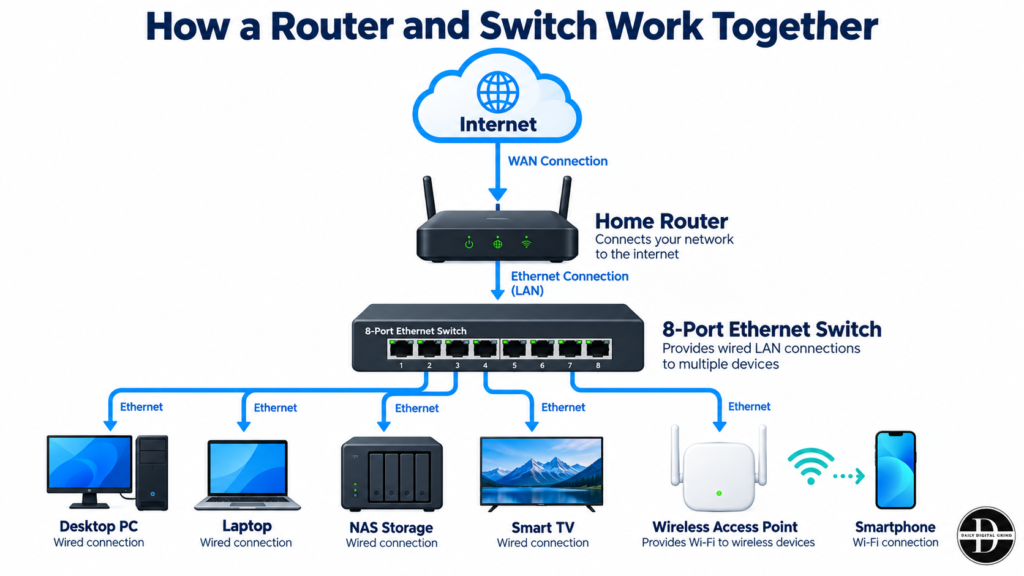
For example, imagine your home router has four Ethernet ports, but you need to connect six devices. Instead of buying another router, you can connect an eight-port Ethernet switch to your existing router and use it to connect your gaming console, desktop computer, smart TV, and other wired devices.
Functions of a Switch
- Connects Devices: A switch links computers, printers, and other devices in a network.
- Manages Data Traffic: It ensures data is sent only to the intended recipient instead of all connected devices.
- Increases Network Efficiency: By directing traffic efficiently, a switch prevents data collisions.
Types of Switches
Here are the different types of switches that are commonly used:
- Unmanaged Switches: Simple plug-and-play devices used in small networks.
- Managed Switches: Provide extensive configuration, monitoring, VLANs, and security features
- Smart Switches: Offer selected management features, often including VLANs and QoS
- Layer 2 Switches: Operate on the data link layer and use MAC addresses to forward data.
- Layer 3 Switches: Work like routers and can manage data based on IP addresses.
Switch vs Router: Which One Is Right For You?
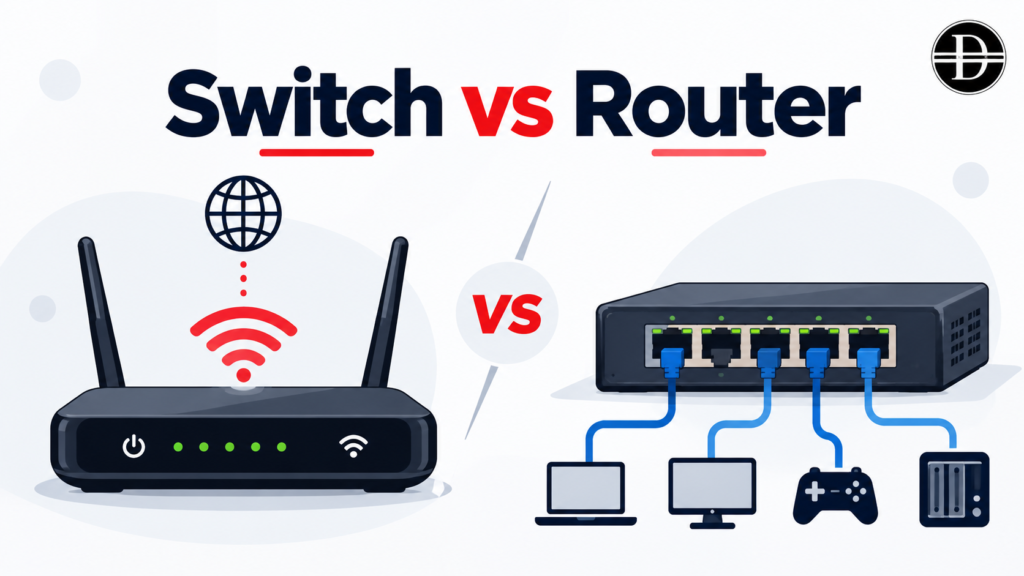
The right choice depends on what you’re trying to accomplish, not which device has more features. In fact, for many homes and small businesses, using both devices is the most practical setup.
When Should You Choose a Router?
A router is the better choice when you need to connect your home or office network to the internet, manage traffic between networks, or provide network services such as DHCP, NAT, and firewall protection.
For example, if you’re setting up internet access in a new home, a wireless router can connect your laptops, phones, gaming consoles, and smart TVs through Wi-Fi or Ethernet. Depending on your internet connection, you may also need a separate modem or optical network terminal (ONT).
However, buying another router simply because you’ve run out of Ethernet ports is usually unnecessary.
When Should You Choose a Network Switch?
A network switch makes more sense when your existing router works perfectly, but you need additional wired connections.
Imagine you have a gaming PC, PlayStation, smart TV, and NAS (network-attached storage), but only two available Ethernet ports on your router.
An eight-port Gigabit Ethernet switch lets you connect these devices without replacing your router or creating a second network.
A switch is particularly useful when you want reliable wired connectivity, need to connect several devices in one room, or frequently transfer large files between computers and a NAS.
Remember, adding a switch doesn’t automatically improve your internet speed. It expands network connectivity and can support faster local transfers when the connected devices and links allow it.
Can You Use a Router and Switch Together?
Yes. In fact, using a router and switch together is common in homes and offices.
The router connects your local network to the internet, while the switch provides additional Ethernet ports for devices on that network.
For example, a small office could connect its router to a 16-port switch, then connect employee computers, printers, and network storage to that switch. The router continues handling internet access, while the switch manages local Ethernet communication.
If your home or office also needs better Wi-Fi coverage, you can connect a wireless access point to the network switch. The router handles communication between networks, the switch provides additional wired connections, and the access point allows wireless devices to connect to your local network.
This setup is particularly useful in larger homes and offices where a single Wi-Fi router cannot provide reliable coverage everywhere.
Quick Decision Guide for Choosing Router vs Switch
If you are still confused about which one, router or switch, you should be using, follow this quick reference guide.
| Your Situation | Best Choice |
|---|---|
| Setting up internet access for a new home | Router |
| Running out of Ethernet ports | Network switch |
| Connecting multiple gaming devices using Ethernet | Network switch |
| Connecting computers and network storage locally | Network switch |
| Creating separate networks with routing between them | Router or appropriately configured Layer 3 equipment |
| Connecting 10–20 office computers to an existing network | Network switch |
| Building a home or small-office network from scratch | Router + switch if extra ports are needed |
| Powering IP cameras or wireless access points through Ethernet | PoE switch |
Choosing the Right Device for Your Network
For Home Networks
A router with built-in switch functionality is usually enough. Most Wi-Fi routers already include Ethernet ports that act as a small switch for wired connections.
For Small Offices
A router with a separate switch is a better choice. The router connects to the internet, while the switch allows multiple wired devices to connect efficiently.
For Large Enterprises
Larger networks require multiple switches connected to a powerful core router. Managed switches help organize traffic and improve security through VLANs.
Quick link: WiFi 6 vs WiFi 6E
Can You Use a Network Switch Without a Router?
Yes, you can use a network switch without a router, but the connected devices will generally only be able to communicate within the same local network. A switch can connect computers, printers, and network storage devices without requiring an internet connection.
For instance, imagine you have two desktop computers and a network-attached storage (NAS) device. By connecting all three to an Ethernet switch, you can transfer files between the computers and access shared storage without using a router.
However, most basic network switches don’t automatically assign IP addresses. Without a router or another DHCP server, you may need to configure static IP addresses on the devices or rely on automatic link-local addressing where supported.
When does using a switch without a router make sense? It can be useful for isolated lab environments, local file-sharing networks, or systems that intentionally don’t require internet access.
Is a Network Switch Faster Than a Router?
A network switch isn’t automatically faster than a router. Both devices can support high-speed connections, but their performance depends on hardware specifications, port speeds, network configuration, and the type of traffic being handled.
A switch is designed primarily to forward traffic between devices on a local network. A router performs additional tasks, such as forwarding traffic between networks, applying firewall rules, and sometimes handling NAT.
These extra responsibilities can introduce processing overhead, but that doesn’t mean routers are inherently slow. Modern routers often use specialized hardware to forward traffic at high speeds.
Does a Switch Improve Internet Speed?
Adding an Ethernet switch typically won’t increase the internet speed provided by your ISP.
Suppose you have a 500 Mbps internet connection and add an eight-port Gigabit Ethernet switch. Your internet plan still provides a maximum of approximately 500 Mbps under ideal conditions, even though the switch supports 1 Gbps connections.
What the switch does provide is more wired connectivity. This can be useful when you want to connect multiple devices without relying on Wi-Fi.
If your wireless connection is unstable or congested, switching a device to Ethernet may improve its real-world connection speed, latency consistency, and reliability. However, those improvements come from the wired connection.
What About Local File Transfers?
A network switch can be particularly useful when transferring large files between devices on the same network. Let’s consider two computers connected to a Gigabit Ethernet switch, with one transferring a 10 GB video project to the other.
For context, Gigabit Ethernet supports a theoretical data rate of 1,000 Mbps, equivalent to 125 MB/s before protocol overhead. This is part of the IEEE 802.3 Ethernet standard, which defines the technical specifications for Ethernet communication.
If both computers are on the same VLAN and subnet, their traffic can travel through the switch without being routed through the internet gateway.
How Do Routers and Switches Work Together?
Consider a home office with two computers, a gaming console, a smart TV, and a network-attached storage (NAS) device. Rather than connecting every device directly to the router, you can connect them to a switch using Ethernet cables.
The setup looks like this:
Common Router and Switch Setup Mistakes
The table below shows the common router and switch setup mistakes, why they happen, and how you can approach these mistakes.
| Common Mistake | Why It Happens | Better Approach |
|---|---|---|
| Buying a second router unnecessarily | Users run out of Ethernet ports and assume they need another router. This can introduce double NAT or separate networks. | Add an unmanaged Ethernet switch to your existing router. |
| Choosing a slow network switch | Older 100 Mbps switches can bottleneck faster internet connections and local transfers. | Choose at least a Gigabit switch; consider 2.5GbE for faster setups. |
| Connecting to the wrong router port | Users confuse WAN and LAN ports, preventing devices from joining the intended network. | Connect the switch to a router’s LAN port, unless your equipment specifies otherwise. |
| Expecting better Wi-Fi coverage | A switch adds wired connections but doesn’t transmit Wi-Fi signals. | Use a wireless access point or mesh Wi-Fi system to improve coverage. |
| Creating network loops or IP conflicts | Incorrect cabling or multiple active DHCP servers can disrupt connectivity. | Avoid redundant connections without loop protection and configure DHCP correctly. |
| Ignoring PoE requirements | Standard switches cannot power devices that require Power over Ethernet. | Choose a compatible PoE switch with sufficient power capacity. |
Power requirements also vary between devices. For instance, standard PoE (IEEE 802.3af) supports up to 15.4 W per port, while PoE+ (IEEE 802.3at) supports up to 30 W. Cisco’s PoE standards and power classifications provide a useful reference when checking equipment compatibility.
Final Verdict
Both routers and switches play essential roles in networking. A router is used to connect different networks and direct internet traffic, while a switch connects devices within the same network and improves data transfer efficiency.
For home users, a Wi-Fi router with built-in Ethernet ports is often enough. However, for businesses and enterprises, using both routers and switches ensures better performance, scalability, and security.
Understanding the difference between a router vs switch can help you make the right decision when setting up a network, whether at home or in a professional environment.
For more in-depth tech and networking insights, follow Daily Digital Grind to stay updated on the latest industry trends.
FAQs
Can You Connect a Switch Directly to a Modem?
You can physically connect a switch to a modem, but it generally won’t provide internet access to multiple devices. Most home internet connections require a router to manage the local network, assign private IP addresses, and share the internet connection. The usual setup is modem → router → switch.
Do You Need a Managed or Unmanaged Switch for My Home?
An unmanaged switch is sufficient for most home networks. It’s plug-and-play and works well for connecting computers, gaming consoles, and smart TVs. A managed switch is worth considering if you need VLANs, traffic monitoring, or advanced network controls.
Does a Network Switch Reduce Internet Speed?
A properly functioning Gigabit Ethernet switch generally won’t noticeably reduce internet speed if its ports and connections can handle your internet plan’s bandwidth. However, a 100 Mbps switch or a slower uplink can become a bottleneck, especially when multiple devices share the connection.
Can a Router Work as a Network Switch?
Yes, most home routers include a built-in Ethernet switch, allowing connected devices to communicate locally. Some routers can also be repurposed as switches by disabling DHCP and using their LAN ports, although the exact setup depends on the model.
Is an Ethernet Switch Better Than a Wi-Fi Extender?
They solve different problems. An Ethernet switch adds wired network connections, while a Wi-Fi extender attempts to expand wireless coverage. If your goal is more reliable Wi-Fi in another room, a wired access point connected through a switch is often a better solution than a basic wireless extender.
How Many Devices Can You Connect to a Network Switch?
It depends on the number of available ports. Common switches have 5, 8, 16, 24, or 48 Ethernet ports. Remember, one port typically connects the switch to your router or existing network, leaving the remaining ports for devices.